Linux vs Windows OS: How Each Operating System Works from the Kernel Up
Operating systems like Linux and Windows may look similar on the surface, but internally they are built on very different philosophies. This article explains what goes inside each OS, how their kernels work, and what really happens in kernel mode.
What Is an Operating System?
An operating system (OS) is the software layer between your hardware and applications. It controls CPU scheduling, memory usage, storage, security, networking, and device drivers. At the heart of every OS is the kernel.
User Mode vs Kernel Mode
Modern operating systems separate execution into two main privilege levels:
- User Mode – Applications run with limited access
- Kernel Mode – The OS has full control of hardware
Any mistake in kernel mode can crash the entire system. This is where Linux and Windows differ most.
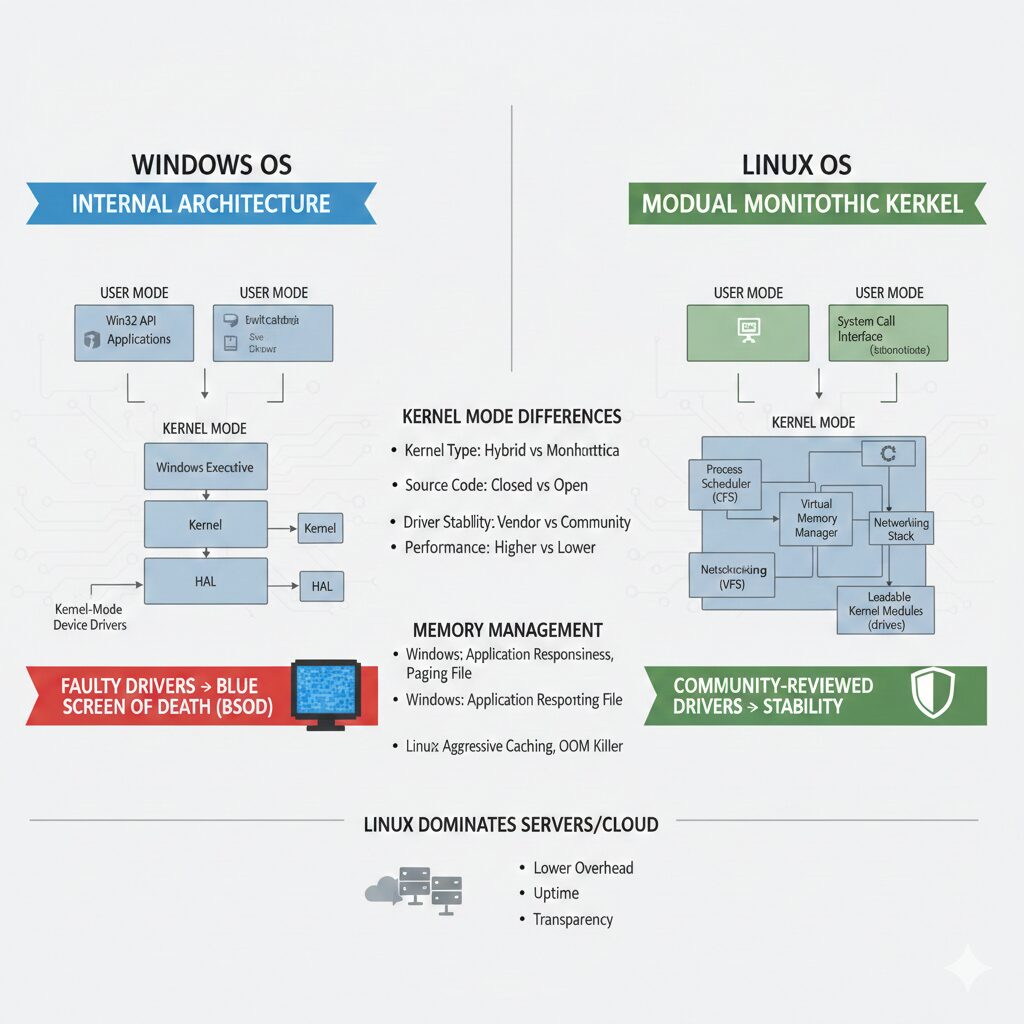
Windows OS Internal Architecture
Windows uses a hybrid kernel architecture. It combines ideas from monolithic and microkernel designs.
Windows Kernel Components
- Windows Executive (memory, processes, I/O, security)
- Kernel (scheduler, interrupt handling)
- Hardware Abstraction Layer (HAL)
- Kernel-mode device drivers
Applications interact with the kernel through the Win32 API, which eventually translates into low-level NT system calls.
Key consequence: Because many drivers run in kernel mode, faulty drivers are the leading cause of the infamous Blue Screen of Death (BSOD).
Linux OS Internal Architecture
Linux uses a monolithic kernel with modular capabilities. This means all core services run in kernel space, but can be dynamically loaded or unloaded.
Linux Kernel Components
- Process Scheduler (CFS)
- Virtual Memory Manager
- Virtual File System (VFS)
- Networking Stack
- Loadable Kernel Modules (drivers)
Linux applications interact with the kernel through a clean and direct system call interface. This design favors performance, transparency, and stability.
Key advantage: Most Linux drivers are open-source and reviewed by the community, making kernel crashes far less common.
Kernel Mode: How Linux and Windows Differ
| Aspect | Windows | Linux |
|---|---|---|
| Kernel Type | Hybrid | Monolithic (Modular) |
| Source Code | Closed | Open Source |
| Driver Stability | Vendor dependent | Community-reviewed |
| Performance Overhead | Higher | Lower |
| Customization | Limited | Extensive |
Memory Management Differences
Windows focuses on application responsiveness using complex memory models like working sets and paging files. Linux aggressively uses free memory as cache, improving overall system throughput.
Linux also includes the OOM Killer, a last-resort mechanism that terminates processes to keep the system alive instead of freezing.
Why Linux Dominates Servers and Cloud
- Lower kernel overhead
- Native container support (cgroups, namespaces)
- Minimal reboot requirements
- Full kernel transparency
- Automation-friendly design
This is why Linux powers most cloud platforms, supercomputers, and enterprise infrastructure.
Final Thoughts
Windows prioritizes usability and backward compatibility, often hiding internal complexity. Linux prioritizes efficiency, control, and architectural clarity.
If Windows is a polished dashboard, Linux is the engine room. Both are powerful — but built for very different worlds.
Want more deep technical breakdowns?
Follow and explore more at:
smartchoicelinks.com
Hashtags
#Linux #WindowsOS #OperatingSystems #KernelMode #LinuxKernel #WindowsKernel #OSArchitecture #SystemProgramming #DevOps #CloudComputing #CyberSecurity #OpenSource #TechBlog #SoftwareEngineering

Leave a Reply